
SharePoint Training Classes in Gresham, Oregon
Learn SharePoint in Gresham, Oregon and surrounding areas via our hands-on, expert led courses. All of our classes either are offered on an onsite, online or public instructor led basis. Here is a list of our current SharePoint related training offerings in Gresham, Oregon: SharePoint Training
SharePoint Training Catalog
Course Directory [training on all levels]
- .NET Classes
- Agile/Scrum Classes
- AI Classes
- Ajax Classes
- Android and iPhone Programming Classes
- Azure Classes
- Blaze Advisor Classes
- C Programming Classes
- C# Programming Classes
- C++ Programming Classes
- Cisco Classes
- Cloud Classes
- CompTIA Classes
- Crystal Reports Classes
- Data Classes
- Design Patterns Classes
- DevOps Classes
- Foundations of Web Design & Web Authoring Classes
- Git, Jira, Wicket, Gradle, Tableau Classes
- IBM Classes
- Java Programming Classes
- JBoss Administration Classes
- JUnit, TDD, CPTC, Web Penetration Classes
- Linux Unix Classes
- Machine Learning Classes
- Microsoft Classes
- Microsoft Development Classes
- Microsoft SQL Server Classes
- Microsoft Team Foundation Server Classes
- Microsoft Windows Server Classes
- Oracle, MySQL, Cassandra, Hadoop Database Classes
- Perl Programming Classes
- Python Programming Classes
- Ruby Programming Classes
- SAS Classes
- Security Classes
- SharePoint Classes
- SOA Classes
- Tcl, Awk, Bash, Shell Classes
- UML Classes
- VMWare Classes
- Web Development Classes
- Web Services Classes
- Weblogic Administration Classes
- XML Classes
- RED HAT ENTERPRISE LINUX AUTOMATION WITH ANSIBLE
9 November, 2026 - 12 November, 2026 - AWS Certified Machine Learning: Specialty (MLS-C01)
2 November, 2026 - 6 November, 2026 - RED HAT ENTERPRISE LINUX SYSTEMS ADMIN I
7 December, 2026 - 11 December, 2026 - RED HAT ENTERPRISE LINUX SYSTEMS ADMIN II
2 November, 2026 - 5 November, 2026 - DOCKER WITH KUBERNETES ADMINISTRATION
30 November, 2026 - 4 December, 2026 - See our complete public course listing
Blog Entries publications that: entertain, make you think, offer insight
As part of our C++ Tutorials series, here is a free overview of C++ pointers you may enjoy and find beneficial.

Information Technology is one of the most dynamic industries with new technologies surfacing frequently. In such a scenario, it can get intimidating for information technology professionals at all levels to keep abreast of the latest technology innovations worth investing time and resources into.
It can therefore get daunting for entry and mid-level IT professionals to decide which technologies they should potentially be developing skills. However, the biggest challenge comes for senior information technology professionals responsible for driving the IT strategy in their organizations.
It is therefore important to keep abreast of the latest technology trends and get them from reputable sources. Here are some of the ways to keep on top of the latest trends in Information Technology.
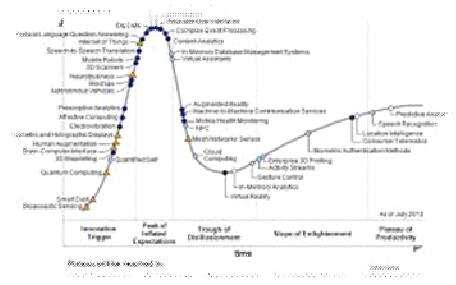
· Subscribe to leading Analyst Firms: If you work for a leading IT organization, chances are that you already have subscription to leading IT analyst firms notably Gartner and Forrester. These two firms are some of the most recognized analyst firms with extensive coverage on almost every enterprise technology including hardware and software. These Analyst firms frequently publish reports on global IT spending and trends that are based on primary research conducted on vendors and global CIOs & CTOs. However, subscription to these reports is very expensive and if you are a part of a small organization you may have issues securing access to these reports. One of the most important pieces of research published by these firms happens to be the Gartner Hype Cycle which plots leading technologies and their maturity curve.Even if you do not have access to Gartner research, you can hack your way by searching for “Gartner Hype Cycle” on Google Images and you will in most cases be able to see the plots similar to the one below
How Can Managers Work More Efficiently with IT?
Would you rather work under someone who is an excellent developer but lacks people skills or leadership capabilities - or for someone that has excellent people skills, communicates well, and is a great leader but has limited understanding of productive coding practices? That’s not to say that the choice is one or the other but in many professional situations it does.
Managing an IT staff comes with numerous challenges, especially if the manager has no previous experience with the coding necessary for completing the project. Managing a business and IT's execution of tasks vary greatly in required skill sets, but it's important to find a cohesive and cooperative middle ground in order to see a project to its end. To fully grasp the intricacies of IT's involvement in the project at hand, managers can do the following to help further their efforts.
Get a basic understanding of coding and technical practices necessary for the project at hand by taking the time to research and practice enough to get a grip on the concept. This will allow managers insight on what their IT folks are really working on daily. Expertise in a programming language is not required, only an overview of the stuff that matters, i.e. understanding the concept of OOP (Object Oriented Programming.) Having this knowledge cannot be overlooked and will gain respect among multiple spectrums in the organization.
Back in the late 90's, there were a number of computer scienctists claiming to know java in hopes of landing a job for $80k+/year. In fact, I know a woman you did just that: land a project management position with a large telecom and have no experience whatsoever. I guess the company figured that some talent was better than no talent and that, with some time and training, she would be productive. Like all gravey train stories, that one, too, had an end. After only a year, she was given a pink slip.
Not only are those days over, job prospects for the IT professional have become considerably more demanding. Saying you know java today is like saying you know that you have expertise with the computer mouse; that's nice, but what else can you do. This demand can be attributed to an increase in global competition along with the introduction of a number of varied technologies. Take .NET, Python, Ruby, Spring, Hibernate ... as an example; most of them, along with many others, are the backbone of the IT infrastructure of most mid-to-large scale US corporations. Imagine the difficulty in finding the right mix of experience, knowledge and talent to support, maintain and devlop with such desparate technologies.
Well imagine no more. According to the IT Hiring Index and Skills Report, seventy percent of CIO’s said it's challenging to find skilled professionals today. If we add the rapid rate of technological innovation into the mix of factors affecting more businesses now than ever before, it’s understandable that the skill gap is widening. Consider this as well: the economic downturn has forced many potential retires to remain in the workforce. This is detailed in MetLife's annual Study of Employee Benefits which states that“more than one-third of surveyed Baby Boomers (35%) say that as a result of economic conditions they plan to postpone their retirement.” How then does the corporation hire new, more informed/better educated talent? Indeed, the IT skills gap is ever widening.
In order to compensate for these skill discrepencies, many firms have resorted to hire the ideal candidates by demanding they possess a christmas wish list of expertise in a variety of different IT disciplines. It would not be uncommon that such individuals have a strong programming background and are brilliant DBA's. What about training? That is certainly a way to diminish the skills gap.
Tech Life in Oregon
| Company Name | City | Industry | Secondary Industry |
|---|---|---|---|
| Precision Castparts Corp. | Portland | Manufacturing | Tools, Hardware and Light Machinery |
| Nike Inc. | Beaverton | Manufacturing | Textiles, Apparel and Accessories |
training details locations, tags and why hsg
The Hartmann Software Group understands these issues and addresses them and others during any training engagement. Although no IT educational institution can guarantee career or application development success, HSG can get you closer to your goals at a far faster rate than self paced learning and, arguably, than the competition. Here are the reasons why we are so successful at teaching:
- Learn from the experts.
- We have provided software development and other IT related training to many major corporations in Oregon since 2002.
- Our educators have years of consulting and training experience; moreover, we require each trainer to have cross-discipline expertise i.e. be Java and .NET experts so that you get a broad understanding of how industry wide experts work and think.
- Discover tips and tricks about SharePoint programming
- Get your questions answered by easy to follow, organized SharePoint experts
- Get up to speed with vital SharePoint programming tools
- Save on travel expenses by learning right from your desk or home office. Enroll in an online instructor led class. Nearly all of our classes are offered in this way.
- Prepare to hit the ground running for a new job or a new position
- See the big picture and have the instructor fill in the gaps
- We teach with sophisticated learning tools and provide excellent supporting course material
- Books and course material are provided in advance
- Get a book of your choice from the HSG Store as a gift from us when you register for a class
- Gain a lot of practical skills in a short amount of time
- We teach what we know…software
- We care…