
Microsoft Windows Server Training Classes in Greeley, Colorado
Learn Microsoft Windows Server in Greeley, Colorado and surrounding areas via our hands-on, expert led courses. All of our classes either are offered on an onsite, online or public instructor led basis. Here is a list of our current Microsoft Windows Server related training offerings in Greeley, Colorado: Microsoft Windows Server Training
Microsoft Windows Server Training Catalog
Course Directory [training on all levels]
- .NET Classes
- Agile/Scrum Classes
- AI Classes
- Ajax Classes
- Android and iPhone Programming Classes
- Azure Classes
- Blaze Advisor Classes
- C Programming Classes
- C# Programming Classes
- C++ Programming Classes
- Cisco Classes
- Cloud Classes
- CompTIA Classes
- Crystal Reports Classes
- Data Classes
- Design Patterns Classes
- DevOps Classes
- Foundations of Web Design & Web Authoring Classes
- Git, Jira, Wicket, Gradle, Tableau Classes
- IBM Classes
- Java Programming Classes
- JBoss Administration Classes
- JUnit, TDD, CPTC, Web Penetration Classes
- Linux Unix Classes
- Machine Learning Classes
- Microsoft Classes
- Microsoft Development Classes
- Microsoft SQL Server Classes
- Microsoft Team Foundation Server Classes
- Microsoft Windows Server Classes
- Oracle, MySQL, Cassandra, Hadoop Database Classes
- Perl Programming Classes
- Python Programming Classes
- Ruby Programming Classes
- SAS Classes
- Security Classes
- SharePoint Classes
- SOA Classes
- Tcl, Awk, Bash, Shell Classes
- UML Classes
- VMWare Classes
- Web Development Classes
- Web Services Classes
- Weblogic Administration Classes
- XML Classes
- AWS Certified Machine Learning: Specialty (MLS-C01)
2 November, 2026 - 6 November, 2026 - RED HAT ENTERPRISE LINUX SYSTEMS ADMIN I
7 December, 2026 - 11 December, 2026 - RED HAT ENTERPRISE LINUX AUTOMATION WITH ANSIBLE
9 November, 2026 - 12 November, 2026 - DOCKER WITH KUBERNETES ADMINISTRATION
30 November, 2026 - 4 December, 2026 - RED HAT ENTERPRISE LINUX SYSTEMS ADMIN II
2 November, 2026 - 5 November, 2026 - See our complete public course listing
Blog Entries publications that: entertain, make you think, offer insight
I remember the day like it was yesterday. Pac Man had finally arrived on the Atari 2600. It was a clear and sunny day, but it was slightly brisk. My dad drove us down to the video store about three miles from our Michigan house. If I remember correctly, the price for the game was $24.99. It was quite expensive for the day, probably equaling a $70 game in today’s market, but it was mine. There *was* no question about it. If you purchase a game, it’s your game… right?
You couldn’t be more wrong. With all the licensing agreements in games today, you only purchase the right to play it. You don’t actually “own” the game.
Today, game designers want total control over the money that comes in for a game. They add in clauses that keep the game from being resold, rented, borrowed, copied, etc. All of the content in the game, including the items you find that are specifically for you, are owned by the software developer. Why, you ask, do they do this? It’s all about the money.
This need for greed started years ago, when people started modifying current games on the market. One of the first games like this was Doom. There were so many third part mods made, but because of licensing agreement, none of these versions were available for resale. The end user, or you, had to purchase Doom before they could even install the mod. None of these “modders” were allowed to make any money off their creation.
Many of us who have iPhones download every interesting app we find on the App Store, especially when they’re free. They can range from a simple payment method app, to a game, to a measurement tool. But, as you may have noticed, our phones become cluttered with tons of pages that we have to swipe through to get to an app that we need on demand. However, with an update by Apple that came out not so long ago, you are able to group your applications into categories that are easily accessible, for all of you organization lovers.
To achieve this grouping method, take a hold of one of the applications you want to categorize. Take a game for example. What you want to do is press your finger on that particular application, and hold it there until all of the applications on the screen begin to jiggle. This is where the magic happens. Drag it over to another game application you want to have in the same category, and release. Your applications should now be held in a little container on your screen. However, a step ago, if you did not have another game application on the same screen, and since you can’t swipe, try putting the held game application on any application you choose, and simply remove that extra application from the list, after moving over another gaming application from a different page.
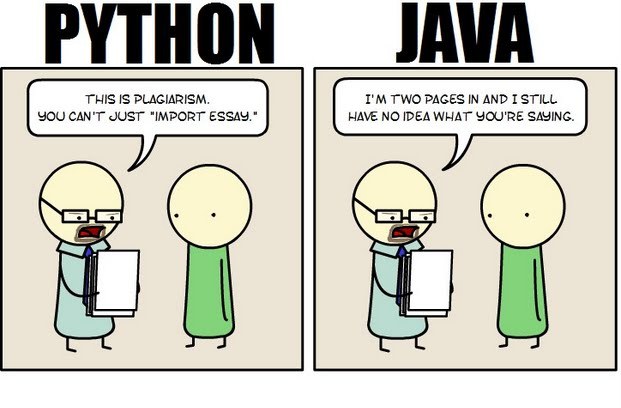 Java still has its place in the world of software development, but is it quickly becoming obsolete by the more dynamically enabled Python programming language? The issue is hotly contested by both sides of the debate. Java experts point out that Java is still being developed with more programmer friendly updates. Python users swear that Java can take up to ten times longer to develop. Managers that need to make the best decision for a company need concrete information so that an informed and rational decision can be made.
First, Java is a static typed language while Python is dynamically typed. Static typed languages require that each variable name must be tied to both a type and an object. Dynamically typed languages only require that a variable name only gets bound to an object. Immediately, this puts Python ahead of the game in terms of productivity since a static typed language requires several elements and can make errors in coding more likely.
Python uses a concise language while Java uses verbose language. Concise language, as the name suggests, gets straight to the point without extra words. Removing additional syntax can greatly reduce the amount of time required to program. A simple call in Java, such as the ever notorious "Hello, World" requires three several lines of coding while Python requires a single sentence. Java requires the use of checked exceptions. If the exceptions are not caught or thrown out then the code fails to compile. In terms of language, Python certainly has surpassed Java in terms of brevity.
Additionally, while Java's string handling capabilities have improved they haven't yet matched the sophistication of Python's. Web applications rely upon fast load times and extraneous code can increase user wait time. Python optimizes code in ways that Java doesn't, and this can make Python a more efficient language. However, Java does run faster than Python and this can be a significant advantage for programmers using Java. When you factor in the need for a compiler for Java applications the speed factor cancels itself out leaving Python and Java at an impasse.
While a programmer will continue to argue for the language that makes it easiest based on the programmer's current level of knowledge, new software compiled with Python takes less time and provides a simplified coding language that reduces the chance for errors. When things go right, Java works well and there are no problems. However, when errors get introduced into the code, it can become extremely time consuming to locate and correct those errors. Python generally uses less code to begin with and makes it easier and more efficient to work with.
Ultimately, both languages have their own strengths and weaknesses. For creating simple applications, Python provides a simpler and more effective application. Larger applications can benefit from Java and the verbosity of the code actually makes it more compatible with future versions. Python code has been known to break with new releases. Ultimately, Python works best as a type of connecting language to conduct quick and dirty work that would be too intensive when using Java alone. In this sense, Java is a low-level implementation language. While both languages are continuing to develop, it's unlikely that one language will surpass the other for all programming needs in the near future.
Tech Life in Colorado
| Company Name | City | Industry | Secondary Industry |
|---|---|---|---|
| Level 3 Communications, Inc | Broomfield | Telecommunications | Telecommunications Other |
| Liberty Global, Inc. | Englewood | Telecommunications | Video and Teleconferencing |
| Liberty Media Corporation | Englewood | Media and Entertainment | Media and Entertainment Other |
| Western Union Company | Englewood | Financial Services | Financial Services Other |
| Ball Corporation | Broomfield | Manufacturing | Metals Manufacturing |
| Pilgrim's Pride Corporation | Greeley | Manufacturing | Food and Dairy Product Manufacturing and Packaging |
| Molson Coors Brewing Company | Denver | Manufacturing | Alcoholic Beverages |
| DISH Network Corporation | Englewood | Media and Entertainment | Media and Entertainment Other |
| Arrow Electronics, Inc. | Englewood | Computers and Electronics | Networking Equipment and Systems |
| DaVita, Inc. | Denver | Healthcare, Pharmaceuticals and Biotech | Outpatient Care Centers |
| Blockbuster LLC | Englewood | Media and Entertainment | Media and Entertainment Other |
| CH2M HILL | Englewood | Energy and Utilities | Alternative Energy Sources |
| Newmont Mining Corporation | Greenwood Vlg | Agriculture and Mining | Mining and Quarrying |
training details locations, tags and why hsg
The Hartmann Software Group understands these issues and addresses them and others during any training engagement. Although no IT educational institution can guarantee career or application development success, HSG can get you closer to your goals at a far faster rate than self paced learning and, arguably, than the competition. Here are the reasons why we are so successful at teaching:
- Learn from the experts.
- We have provided software development and other IT related training to many major corporations in Colorado since 2002.
- Our educators have years of consulting and training experience; moreover, we require each trainer to have cross-discipline expertise i.e. be Java and .NET experts so that you get a broad understanding of how industry wide experts work and think.
- Discover tips and tricks about Microsoft Windows Server programming
- Get your questions answered by easy to follow, organized Microsoft Windows Server experts
- Get up to speed with vital Microsoft Windows Server programming tools
- Save on travel expenses by learning right from your desk or home office. Enroll in an online instructor led class. Nearly all of our classes are offered in this way.
- Prepare to hit the ground running for a new job or a new position
- See the big picture and have the instructor fill in the gaps
- We teach with sophisticated learning tools and provide excellent supporting course material
- Books and course material are provided in advance
- Get a book of your choice from the HSG Store as a gift from us when you register for a class
- Gain a lot of practical skills in a short amount of time
- We teach what we know…software
- We care…