
Microsoft SQL Server Training Classes in Florissant, Missouri
Learn Microsoft SQL Server in Florissant, Missouri and surrounding areas via our hands-on, expert led courses. All of our classes either are offered on an onsite, online or public instructor led basis. Here is a list of our current Microsoft SQL Server related training offerings in Florissant, Missouri: Microsoft SQL Server Training
Microsoft SQL Server Training Catalog
Course Directory [training on all levels]
- .NET Classes
- Agile/Scrum Classes
- AI Classes
- Ajax Classes
- Android and iPhone Programming Classes
- Azure Classes
- Blaze Advisor Classes
- C Programming Classes
- C# Programming Classes
- C++ Programming Classes
- Cisco Classes
- Cloud Classes
- CompTIA Classes
- Crystal Reports Classes
- Data Classes
- Design Patterns Classes
- DevOps Classes
- Foundations of Web Design & Web Authoring Classes
- Git, Jira, Wicket, Gradle, Tableau Classes
- IBM Classes
- Java Programming Classes
- JBoss Administration Classes
- JUnit, TDD, CPTC, Web Penetration Classes
- Linux Unix Classes
- Machine Learning Classes
- Microsoft Classes
- Microsoft Development Classes
- Microsoft SQL Server Classes
- Microsoft Team Foundation Server Classes
- Microsoft Windows Server Classes
- Oracle, MySQL, Cassandra, Hadoop Database Classes
- Perl Programming Classes
- Python Programming Classes
- Ruby Programming Classes
- SAS Classes
- Security Classes
- SharePoint Classes
- SOA Classes
- Tcl, Awk, Bash, Shell Classes
- UML Classes
- VMWare Classes
- Web Development Classes
- Web Services Classes
- Weblogic Administration Classes
- XML Classes
- OPENSHIFT ADMINISTRATION
19 October, 2026 - 21 October, 2026 - RED HAT ENTERPRISE LINUX SYSTEMS ADMIN II
2 November, 2026 - 5 November, 2026 - AWS Certified Machine Learning: Specialty (MLS-C01)
2 November, 2026 - 6 November, 2026 - DOCKER WITH KUBERNETES ADMINISTRATION
30 November, 2026 - 4 December, 2026 - RED HAT ENTERPRISE LINUX AUTOMATION WITH ANSIBLE
9 November, 2026 - 12 November, 2026 - See our complete public course listing
Blog Entries publications that: entertain, make you think, offer insight
 Millions of people experienced the frustration and failures of the Obamacare website when it first launched. Because the code for the back end is not open source, the exact technicalities of the initial failings are tricky to determine. Many curious programmers and web designers have had time to examine the open source coding on the front end, however, leading to reasonable conclusions about the nature of the overall difficulties.
Lack of End to End Collaboration
The website was developed with multiple contractors for the front-end and back-end functions. The site also needed to be integrated with insurance companies, IRS servers, Homeland Security servers, and the Department of Veterans Affairs, all of whom had their own legacy systems. The large number of parties involved and the complex nature of the various components naturally complicated the testing and integration of each portion of the project.
The errors displayed, and occasionally the lack thereof, indicated an absence of coordination between the parties developing the separate components. A failed sign up attempt, for instance, often resulted in a page that displayed the header but had no content or failure message. A look at end user requests revealed that the database was unavailable. Clearly, the coding for the front end did not include errors for failures on the back end.
Bloat and the Abundance of Minor Issues
Obviously, numerous bugs were also an issue. The system required users to create passwords that included numbers, for example, but failed to disclose that on the form and in subsequent failure messages, leaving users baffled. In another issue, one of the pages intended to ask users to please wait or call instead, but the message and the phone information were accidentally commented out in the code.
While the front-end design has been cleared of blame for the most serious failures, bloat in the code did contribute to the early difficulties users experienced. The site design was heavy with Javascript and CSS files, and it was peppered with small coding errors that became particularly troublesome when users faced bottlenecks in traffic. Frequent typos throughout the code proved to be an additional embarrassment and were another indication of a troubled development process.
NoSQL Database
The NoSQL database is intended to allow for scalability and flexibility in the architecture of projects that will use it. This made NoSQL a logical choice for the health insurance exchange website. The newness of the technology, however, means personnel with expertise can be elusive. Database-related missteps were more likely the result of a lack of experienced administrators than with the technology itself. The choice of the NoSQL database was thus another complication in the development, but did not itself cause the failures.
Another factor of consequence is that the website was built with both agile and waterfall methodology elements. With agile methods for the front end and the waterfall methodology for the back end, streamlining was naturally going to suffer further difficulties. The disparate contractors, varied methods of software development, and an unrealistically short project time line all contributed to the coding failures of the website.
I’ll get straight to the point. Why should companies invest more in management training? Here are 10 simple reasons.
1) An employee’s relationship with his or her direct manager is the most important single factor in employee engagement.
2) Engaged employees are happier and more productive. Disengaged employees are frustrated and more disruptive.
3) Because there’s no widely agreed-on skillset for management (good managers come in all shapes and sizes), there’s an assumption everyone knows how to do it. This is akin to someone who’s never driven before being given keys to a car and told: “Drive.” (Many many years ago, this is how I first learned to manage. I blundered my way through it. Trial and error. It wasn’t pretty.)
 Technology is wonderful. It helps us run our businesses and connects us to the world. But when computer problems get in the way of getting what you need to get done, you can go from easygoing to mad-as-a-hornet in 3 seconds flat. Before you panic or give in to the temptation to throw your computer out the window, try these easy fixes.
5 Common Computer Problems
- Sluggish PC
A sluggish PC often means low disk space caused by an accumulation of temporary Internet files, photos, music, and downloads. One of the easiest fixes for a slow PC is to clear your cache.
The way you’ll do this will depend on the Internet browser you use:
- Chrome– On the top right-hand side of the screen, you’ll see what looks like a window blind. Click on that. Click on ‘History’ and hit ‘Clear Browsing Data’.
- Safari– On the upper left-hand side, you’ll see a tab marked ‘Safari’. Click on that. Scroll down and hit ‘Empty Cache’.
- Internet Explorer– Click on ‘Tools’ and scroll down to ‘Internet Options’. Under ‘Browsing History’ click ‘Delete’. Delete files and cookies.
- FireFox – At the top of the window click ‘Tools’ then go to ‘Options’. Select the ‘Advanced’ panel and click on the ‘Network’ tab. Go to ‘Cached Web Content’ and hit ‘Clear Now’.
Information Technology is one of the most dynamic industries with new technologies surfacing frequently. In such a scenario, it can get intimidating for information technology professionals at all levels to keep abreast of the latest technology innovations worth investing time and resources into.
It can therefore get daunting for entry and mid-level IT professionals to decide which technologies they should potentially be developing skills. However, the biggest challenge comes for senior information technology professionals responsible for driving the IT strategy in their organizations.
It is therefore important to keep abreast of the latest technology trends and get them from reputable sources. Here are some of the ways to keep on top of the latest trends in Information Technology.
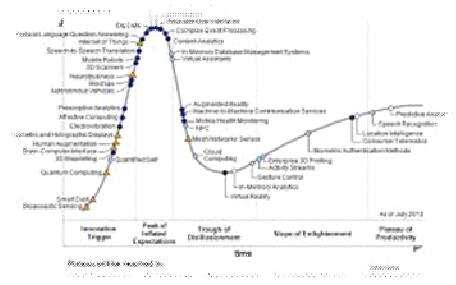
· Subscribe to leading Analyst Firms: If you work for a leading IT organization, chances are that you already have subscription to leading IT analyst firms notably Gartner and Forrester. These two firms are some of the most recognized analyst firms with extensive coverage on almost every enterprise technology including hardware and software. These Analyst firms frequently publish reports on global IT spending and trends that are based on primary research conducted on vendors and global CIOs & CTOs. However, subscription to these reports is very expensive and if you are a part of a small organization you may have issues securing access to these reports. One of the most important pieces of research published by these firms happens to be the Gartner Hype Cycle which plots leading technologies and their maturity curve.Even if you do not have access to Gartner research, you can hack your way by searching for “Gartner Hype Cycle” on Google Images and you will in most cases be able to see the plots similar to the one below
Tech Life in Missouri
| Company Name | City | Industry | Secondary Industry |
|---|---|---|---|
| Patriot Coal Corporation | Saint Louis | Agriculture and Mining | Mining and Quarrying |
| Solutia Inc. | Saint Louis | Manufacturing | Chemicals and Petrochemicals |
| Monsanto Company | Saint Louis | Agriculture and Mining | Agriculture and Mining Other |
| Kansas City Power and Light Company | Kansas City | Energy and Utilities | Gas and Electric Utilities |
| The Laclede Group, Inc. | Saint Louis | Energy and Utilities | Gas and Electric Utilities |
| Peabody Energy Corporation | Saint Louis | Agriculture and Mining | Mining and Quarrying |
| Emerson Electric Company | Saint Louis | Manufacturing | Tools, Hardware and Light Machinery |
| Energizer Holdings, Inc. | Saint Louis | Manufacturing | Manufacturing Other |
| Centene Corporation | Saint Louis | Healthcare, Pharmaceuticals and Biotech | Healthcare, Pharmaceuticals, and Biotech Other |
| Express Scripts | Saint Louis | Healthcare, Pharmaceuticals and Biotech | Pharmaceuticals |
| Reinsurance Group of America, Incorporated | Chesterfield | Financial Services | Insurance and Risk Management |
| Ameren Corporation | Saint Louis | Energy and Utilities | Gas and Electric Utilities |
| DST Systems, Inc. | Kansas City | Computers and Electronics | Networking Equipment and Systems |
| Inergy, L.P. | Kansas City | Energy and Utilities | Alternative Energy Sources |
| Leggett and Platt, Incorporated | Carthage | Manufacturing | Furniture Manufacturing |
| Cerner Corporation | Kansas City | Software and Internet | Software |
| O'Reilly Automotive, Inc. | Springfield | Retail | Automobile Parts Stores |
| AMC Theatres | Kansas City | Media and Entertainment | Motion Picture Exhibitors |
| Sigma-Aldrich Corporation | Saint Louis | Manufacturing | Chemicals and Petrochemicals |
| HandR Block | Kansas City | Financial Services | Securities Agents and Brokers |
| Graybar Services, Inc. | Saint Louis | Wholesale and Distribution | Wholesale and Distribution Other |
| Edward Jones | Saint Louis | Financial Services | Personal Financial Planning and Private Banking |
| Arch Coal, Inc. | Saint Louis | Energy and Utilities | Alternative Energy Sources |
| Brown Shoe Company, Inc. | Saint Louis | Retail | Clothing and Shoes Stores |
| Ralcorp Holdings, Inc. | Saint Louis | Manufacturing | Food and Dairy Product Manufacturing and Packaging |
training details locations, tags and why hsg
The Hartmann Software Group understands these issues and addresses them and others during any training engagement. Although no IT educational institution can guarantee career or application development success, HSG can get you closer to your goals at a far faster rate than self paced learning and, arguably, than the competition. Here are the reasons why we are so successful at teaching:
- Learn from the experts.
- We have provided software development and other IT related training to many major corporations in Missouri since 2002.
- Our educators have years of consulting and training experience; moreover, we require each trainer to have cross-discipline expertise i.e. be Java and .NET experts so that you get a broad understanding of how industry wide experts work and think.
- Discover tips and tricks about Microsoft SQL Server programming
- Get your questions answered by easy to follow, organized Microsoft SQL Server experts
- Get up to speed with vital Microsoft SQL Server programming tools
- Save on travel expenses by learning right from your desk or home office. Enroll in an online instructor led class. Nearly all of our classes are offered in this way.
- Prepare to hit the ground running for a new job or a new position
- See the big picture and have the instructor fill in the gaps
- We teach with sophisticated learning tools and provide excellent supporting course material
- Books and course material are provided in advance
- Get a book of your choice from the HSG Store as a gift from us when you register for a class
- Gain a lot of practical skills in a short amount of time
- We teach what we know…software
- We care…