
Microsoft Windows Server Training Classes in Bridgeport, Connecticut
Learn Microsoft Windows Server in Bridgeport, Connecticut and surrounding areas via our hands-on, expert led courses. All of our classes either are offered on an onsite, online or public instructor led basis. Here is a list of our current Microsoft Windows Server related training offerings in Bridgeport, Connecticut: Microsoft Windows Server Training
Microsoft Windows Server Training Catalog
Course Directory [training on all levels]
- .NET Classes
- Agile/Scrum Classes
- AI Classes
- Ajax Classes
- Android and iPhone Programming Classes
- Azure Classes
- Blaze Advisor Classes
- C Programming Classes
- C# Programming Classes
- C++ Programming Classes
- Cisco Classes
- Cloud Classes
- CompTIA Classes
- Crystal Reports Classes
- Data Classes
- Design Patterns Classes
- DevOps Classes
- Foundations of Web Design & Web Authoring Classes
- Git, Jira, Wicket, Gradle, Tableau Classes
- IBM Classes
- Java Programming Classes
- JBoss Administration Classes
- JUnit, TDD, CPTC, Web Penetration Classes
- Linux Unix Classes
- Machine Learning Classes
- Microsoft Classes
- Microsoft Development Classes
- Microsoft SQL Server Classes
- Microsoft Team Foundation Server Classes
- Microsoft Windows Server Classes
- Oracle, MySQL, Cassandra, Hadoop Database Classes
- Perl Programming Classes
- Python Programming Classes
- Ruby Programming Classes
- SAS Classes
- Security Classes
- SharePoint Classes
- SOA Classes
- Tcl, Awk, Bash, Shell Classes
- UML Classes
- VMWare Classes
- Web Development Classes
- Web Services Classes
- Weblogic Administration Classes
- XML Classes
- RED HAT ENTERPRISE LINUX SYSTEMS ADMIN II
2 November, 2026 - 5 November, 2026 - RED HAT ENTERPRISE LINUX AUTOMATION WITH ANSIBLE
9 November, 2026 - 12 November, 2026 - AWS Certified Machine Learning: Specialty (MLS-C01)
2 November, 2026 - 6 November, 2026 - RED HAT ENTERPRISE LINUX SYSTEMS ADMIN I
7 December, 2026 - 11 December, 2026 - DOCKER WITH KUBERNETES ADMINISTRATION
30 November, 2026 - 4 December, 2026 - See our complete public course listing
Blog Entries publications that: entertain, make you think, offer insight
Studying a functional programming language is a good way to discover new approaches to problems and different ways of thinking. Although functional programming has much in common with logic and imperative programming, it uses unique abstractions and a different toolset for solving problems. Likewise, many current mainstream languages are beginning to pick up and integrate various techniques and features from functional programming.
Many authorities feel that Haskell is a great introductory language for learning functional programming. However, there are various other possibilities, including Scheme, F#, Scala, Clojure, Erlang and others.
Haskell is widely recognized as a beautiful, concise and high-performing programming language. It is statically typed and supports various cool features that augment language expressivity, including currying and pattern matching. In addition to monads, the language support a type-class system based on methods; this enables higher encapsulation and abstraction. Advanced Haskell will require learning about combinators, lambda calculus and category theory. Haskell allows programmers to create extremely elegant solutions.
Scheme is another good learning language -- it has an extensive history in academia and a vast body of instructional documents. Based on the oldest functional language -- Lisp -- Scheme is actually very small and elegant. Studying Scheme will allow the programmer to master iteration and recursion, lambda functions and first-class functions, closures, and bottom-up design.
Supported by Microsoft and growing in popularity, F# is a multi-paradigm, functional-first programming language that derives from ML and incorporates features from numerous languages, including OCaml, Scala, Haskell and Erlang. F# is described as a functional language that also supports object-oriented and imperative techniques. It is a .NET family member. F# allows the programmer to create succinct, type-safe, expressive and efficient solutions. It excels at parallel I/O and parallel CPU programming, data-oriented programming, and algorithmic development.
Scala is a general-purpose programming and scripting language that is both functional and object-oriented. It has strong static types and supports numerous functional language techniques such as pattern matching, lazy evaluation, currying, algebraic types, immutability and tail recursion. Scala -- from "scalable language" -- enables coders to write extremely concise source code. The code is compiled into Java bytecode and executes on the ubiquitous JVM (Java virtual machine).
Like Scala, Clojure also runs on the Java virtual machine. Because it is based on Lisp, it treats code like data and supports macros. Clojure's immutability features and time-progression constructs enable the creation of robust multithreaded programs.
Erlang is a highly concurrent language and runtime. Initially created by Ericsson to enable real-time, fault-tolerant, distributed applications, Erlang code can be altered without halting the system. The language has a functional subset with single assignment, dynamic typing, and eager evaluation. Erlang has powerful explicit support for concurrent processes.
As part of our C++ Tutorials series, here is a tutorial on the tricks of the trade for using C++ I/O. Keep in mind that an application without I/O is just a black box; no communcation is taking place. 

Information Technology is one of the most dynamic industries with new technologies surfacing frequently. In such a scenario, it can get intimidating for information technology professionals at all levels to keep abreast of the latest technology innovations worth investing time and resources into.
It can therefore get daunting for entry and mid-level IT professionals to decide which technologies they should potentially be developing skills. However, the biggest challenge comes for senior information technology professionals responsible for driving the IT strategy in their organizations.
It is therefore important to keep abreast of the latest technology trends and get them from reputable sources. Here are some of the ways to keep on top of the latest trends in Information Technology.
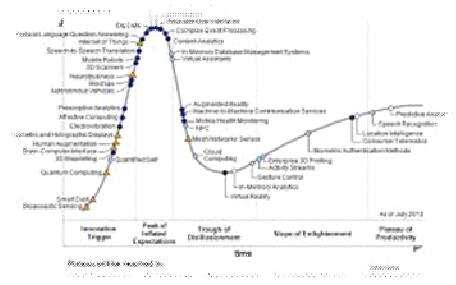
· Subscribe to leading Analyst Firms: If you work for a leading IT organization, chances are that you already have subscription to leading IT analyst firms notably Gartner and Forrester. These two firms are some of the most recognized analyst firms with extensive coverage on almost every enterprise technology including hardware and software. These Analyst firms frequently publish reports on global IT spending and trends that are based on primary research conducted on vendors and global CIOs & CTOs. However, subscription to these reports is very expensive and if you are a part of a small organization you may have issues securing access to these reports. One of the most important pieces of research published by these firms happens to be the Gartner Hype Cycle which plots leading technologies and their maturity curve.Even if you do not have access to Gartner research, you can hack your way by searching for “Gartner Hype Cycle” on Google Images and you will in most cases be able to see the plots similar to the one below
When you think about the black market, I’m sure the majority of you will think of prohibition days. When alcohol was made illegal, it did two things: It made the bad guys more money, and it put the average joe in a dangerous position while trying to acquire it. Bring in the 21stcentury. Sure, there still is a black market… but come on, who is afraid of mobsters anymore? Today, we have a gaming black market. It has been around for years, but will it survive? With more and more games moving towards auction houses, could game companies “tame” the gaming black market?
In the old days of gaming on the internet, we spent most of our online time playing hearts, spades… whatever we could do while connected to the internet. As the years went by, better and better games came about. Then, suddenly, interactive multiplayer games came into the picture. These interactive games, mainly MMORPGS, allowed for characters to pick up and keep randomly generated objects known as “loot”. This evolution of gaming created the black market.
In the eyes of the software companies, the game is only being leased/rented by the end user. You don’t actually have any rights to the game. This is where the market becomes black. The software companies don’t want you making money of “virtual” goods that are housed on the software or servers of the game you are playing on. The software companies, at this point, started to get smarter.
Where there is a demand…
Tech Life in Connecticut
| Company Name | City | Industry | Secondary Industry |
|---|---|---|---|
| Stanley Black and Decker, Inc. | New Britain | Manufacturing | Tools, Hardware and Light Machinery |
| EMCOR Group, Inc. | Norwalk | Energy and Utilities | Energy and Utilities Other |
| The Hartford Financial Services Group Inc. | Hartford | Financial Services | Insurance and Risk Management |
| Crane Co. | Stamford | Manufacturing | Tools, Hardware and Light Machinery |
| Cenveo. Inc. | Stamford | Business Services | Business Services Other |
| Amphenol Corporation | Wallingford | Computers and Electronics | Semiconductor and Microchip Manufacturing |
| W. R. Berkley Corporation | Greenwich | Financial Services | Insurance and Risk Management |
| Silgan Holdings Inc. | Stamford | Manufacturing | Manufacturing Other |
| Hubbell Incorporated | Shelton | Manufacturing | Concrete, Glass, and Building Materials |
| IMS Health Incorporated | Danbury | Business Services | Management Consulting |
| CIGNA Corporation | Hartford | Financial Services | Insurance and Risk Management |
| Chemtura Corp. | Middlebury | Manufacturing | Chemicals and Petrochemicals |
| Harman International Industries, Inc | Stamford | Computers and Electronics | Audio, Video and Photography |
| United Rentals, Inc. | Greenwich | Real Estate and Construction | Construction Equipment and Supplies |
| The Phoenix Companies, Inc. | Hartford | Financial Services | Investment Banking and Venture Capital |
| Magellan Health Services, Inc. | Avon | Healthcare, Pharmaceuticals and Biotech | Healthcare, Pharmaceuticals, and Biotech Other |
| Terex Corporation | Westport | Manufacturing | Heavy Machinery |
| Praxair, Inc. | Danbury | Manufacturing | Chemicals and Petrochemicals |
| Knights of Columbus | New Haven | Non-Profit | Social and Membership Organizations |
| Xerox Corporation | Norwalk | Computers and Electronics | Office Machinery and Equipment |
| Starwood Hotels and Resorts Worldwide, Inc. | Stamford | Travel, Recreation and Leisure | Hotels, Motels and Lodging |
| United Technologies Corporation | Hartford | Manufacturing | Aerospace and Defense |
| General Electric Company | Fairfield | Computers and Electronics | Consumer Electronics, Parts and Repair |
| Pitney Bowes, Inc. | Stamford | Manufacturing | Tools, Hardware and Light Machinery |
| Charter Communications, Inc. | Stamford | Telecommunications | Cable Television Providers |
| Aetna Inc. | Hartford | Financial Services | Insurance and Risk Management |
| Priceline.com | Norwalk | Travel, Recreation and Leisure | Travel, Recreation, and Leisure Other |
training details locations, tags and why hsg
The Hartmann Software Group understands these issues and addresses them and others during any training engagement. Although no IT educational institution can guarantee career or application development success, HSG can get you closer to your goals at a far faster rate than self paced learning and, arguably, than the competition. Here are the reasons why we are so successful at teaching:
- Learn from the experts.
- We have provided software development and other IT related training to many major corporations in Connecticut since 2002.
- Our educators have years of consulting and training experience; moreover, we require each trainer to have cross-discipline expertise i.e. be Java and .NET experts so that you get a broad understanding of how industry wide experts work and think.
- Discover tips and tricks about Microsoft Windows Server programming
- Get your questions answered by easy to follow, organized Microsoft Windows Server experts
- Get up to speed with vital Microsoft Windows Server programming tools
- Save on travel expenses by learning right from your desk or home office. Enroll in an online instructor led class. Nearly all of our classes are offered in this way.
- Prepare to hit the ground running for a new job or a new position
- See the big picture and have the instructor fill in the gaps
- We teach with sophisticated learning tools and provide excellent supporting course material
- Books and course material are provided in advance
- Get a book of your choice from the HSG Store as a gift from us when you register for a class
- Gain a lot of practical skills in a short amount of time
- We teach what we know…software
- We care…