
Microsoft SQL Server Training Classes in Augusta, Maine
Learn Microsoft SQL Server in Augusta, Maine and surrounding areas via our hands-on, expert led courses. All of our classes either are offered on an onsite, online or public instructor led basis. Here is a list of our current Microsoft SQL Server related training offerings in Augusta, Maine: Microsoft SQL Server Training
Microsoft SQL Server Training Catalog
Course Directory [training on all levels]
- .NET Classes
- Agile/Scrum Classes
- AI Classes
- Ajax Classes
- Android and iPhone Programming Classes
- Azure Classes
- Blaze Advisor Classes
- C Programming Classes
- C# Programming Classes
- C++ Programming Classes
- Cisco Classes
- Cloud Classes
- CompTIA Classes
- Crystal Reports Classes
- Data Classes
- Design Patterns Classes
- DevOps Classes
- Foundations of Web Design & Web Authoring Classes
- Git, Jira, Wicket, Gradle, Tableau Classes
- IBM Classes
- Java Programming Classes
- JBoss Administration Classes
- JUnit, TDD, CPTC, Web Penetration Classes
- Linux Unix Classes
- Machine Learning Classes
- Microsoft Classes
- Microsoft Development Classes
- Microsoft SQL Server Classes
- Microsoft Team Foundation Server Classes
- Microsoft Windows Server Classes
- Oracle, MySQL, Cassandra, Hadoop Database Classes
- Perl Programming Classes
- Python Programming Classes
- Ruby Programming Classes
- SAS Classes
- Security Classes
- SharePoint Classes
- SOA Classes
- Tcl, Awk, Bash, Shell Classes
- UML Classes
- VMWare Classes
- Web Development Classes
- Web Services Classes
- Weblogic Administration Classes
- XML Classes
- ASP.NET Core MVC, Rev. 8.0
19 October, 2026 - 20 October, 2026 - OPENSHIFT ADMINISTRATION
19 October, 2026 - 21 October, 2026 - RED HAT ENTERPRISE LINUX SYSTEMS ADMIN I
26 October, 2026 - 30 October, 2026 - RED HAT ENTERPRISE LINUX AUTOMATION WITH ANSIBLE
9 November, 2026 - 12 November, 2026 - AWS Certified Machine Learning: Specialty (MLS-C01)
2 November, 2026 - 6 November, 2026 - See our complete public course listing
Blog Entries publications that: entertain, make you think, offer insight
Unlike Java, Python does not have a string contains method. Instead, use the in operator or the find method. The in operator finds treats the string as a word list whereas the find method looks for substrings. In the example shown below, 'is' is a substring of this but not a word by itself. Therefore, find recoginizes 'is' in this while the in operator does not.
s = "This be a string"
if s.find("is") == -1:
    print "No 'is' here!"
else:
    print "Found 'is' in the string."

if "is" in s:
    print "No 'is' here!"
else:
    print "Found 'is' in the string."

#prints out the following:
Found 'is' in the string
No 'is' here!
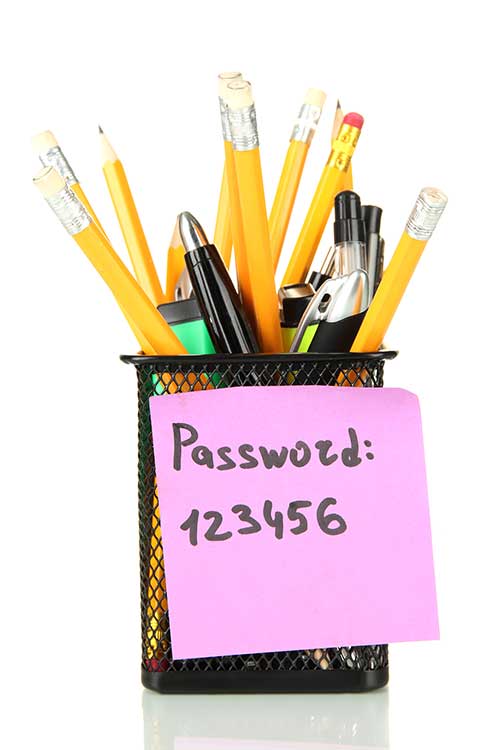
When eCommerce companies want to optimize information security, password management tools enable users to create strong passwords for every login.
Better than a Master Pass
A two-factor authentication, a security process in which the user provides two means of identification, one of which is typically a physical token, such as a card, and the other of which is typically something memorized, such as a security code can drastically reduce online fraud such as identity theft . A common example of two-factor authenticationis a bank card: the card itself is the physical item and the personal identification number (PIN) is the data that goes with it.
LastPass 3.0 Premium and RoboForm, security downloads offer fingerprint-based authentication features that can be configured to any computer PC or mobile application. Both are supported by the Google Authenticator mobile app for smart phone and device integration.
LastPass 3.0 is most powerful on-demand password manager on the market. LastPass 3.0 Premium includes mobile support and more features. Dashlane 2.0 is is not as robust, but includes a user-friendly interface. F-Secure Key is a free, one-device version of these top competitors. F-Secure Key is for exclusive use on an installed device, so password safe retention is dependent on proprietary use of the device itself. The application can be upgraded for a small annual fee.
Password Manager App Cross-Portability
F-Secure Key syncs with Mac, PC Android, and iOS devices simultaneously. A transient code is generated on mobile devices, in addition to the two-factor authentication default of the F-Secure Key master password security product.
Password capture and replay in case of lost credentials is made possible with a password manager. Integration of a password manager app with a browser allows a user to capture login credentials, and replay on revisit to a site. Dashlane, LastPass, Norton Identity Safe, Password Genie 4.0 offer continuous detection and management of password change events, automatically capturing credentials each time a new Web-based, service registration sign up is completed.
Other applications like F-Secure Key, KeePass, and My1login replay passwords via a bookmarklet, supported by any Java-equipped browser. KeePass ups the ante for would be keyloggers, with a unique replay technology.
Personal Data and Auto-Fill Forms
Most password managers fill username and password credentials into login forms automatically. Password managers also retain personal data for form fill interfaces with applications, and other HTML forms online. The RoboForm app is one of the most popular for its flexibility in multi-form password and personal data management, but the others also capture and reuse at least a portion of what has been entered in a form manually.
The 1Password app for Windows stores the most types of personal data for use to fill out forms. Dashlane, LastPass, and Password Genie store the various types of ID data used for form fill-in, like passport and driver's license numbers and other key details to HTML acknowledgement of discretionary password and personal information.
The Cost of Protection
LastPass Premium and Password Box are the lowest monthly password manager plans on the market, going for $1 a month. Annual plans offered by other password manager sources vary according to internal plan: Dashlane $20, F-Secure Key $16, and Password Genie, $15.
All password manager companies and their products may not be alike in the end.
Security checks on security products like password managers have become more sophisticated in response to product cross-portability and open source app interface volatility. Norton, RoboForm, KeePass, generate strong, random passwords on-demand. Some security procedures now require three-factor authentication, which involves possession of a physical token and a password, used in conjunction with biometricdata, such as finger-scanningor a voiceprint.
What are the best languages for getting into functional programming?
The iconic software company that is based in King County Washington has been getting almost universally slammed from it's recent Los Angeles press announcement about its entry into the hardware business with the convertible laptop/tablet known as Surface.
Certainly I can see the point that it is now competing with its hardware vendors/partners. Intel has done a good job in the arena creating 'reference designs' without competing with its partners.
There is another viewpoint which seems to be ignored. The cold facts are Microsoft is a public company. This puts Microsoft in a legal position of doing the most it can to return value to its shareholders. Failure to do so means somebody is going to jail.
Microsoft has a vision, which at the end of the day is, a certain way to get enough people to see enough value to hand over their money, to fulfill their fiduciary duty.
As part of our C++ Tutorials series, here is a tutorial on the tricks of the trade for using C++ I/O. Keep in mind that an application without I/O is just a black box; no communcation is taking place. 

Tech Life in Maine
training details locations, tags and why hsg
The Hartmann Software Group understands these issues and addresses them and others during any training engagement. Although no IT educational institution can guarantee career or application development success, HSG can get you closer to your goals at a far faster rate than self paced learning and, arguably, than the competition. Here are the reasons why we are so successful at teaching:
- Learn from the experts.
- We have provided software development and other IT related training to many major corporations in Maine since 2002.
- Our educators have years of consulting and training experience; moreover, we require each trainer to have cross-discipline expertise i.e. be Java and .NET experts so that you get a broad understanding of how industry wide experts work and think.
- Discover tips and tricks about Microsoft SQL Server programming
- Get your questions answered by easy to follow, organized Microsoft SQL Server experts
- Get up to speed with vital Microsoft SQL Server programming tools
- Save on travel expenses by learning right from your desk or home office. Enroll in an online instructor led class. Nearly all of our classes are offered in this way.
- Prepare to hit the ground running for a new job or a new position
- See the big picture and have the instructor fill in the gaps
- We teach with sophisticated learning tools and provide excellent supporting course material
- Books and course material are provided in advance
- Get a book of your choice from the HSG Store as a gift from us when you register for a class
- Gain a lot of practical skills in a short amount of time
- We teach what we know…software
- We care…