
Microsoft Office Training Classes in Spokane Valley, Washington
Learn Microsoft Office in Spokane Valley, Washington and surrounding areas via our hands-on, expert led courses. All of our classes either are offered on an onsite, online or public instructor led basis. Here is a list of our current Microsoft Office related training offerings in Spokane Valley, Washington: Microsoft Office Training
Microsoft Office Training Catalog
subcategories
Business Analysis Classes
Course Directory [training on all levels]
- .NET Classes
- Agile/Scrum Classes
- AI Classes
- Ajax Classes
- Android and iPhone Programming Classes
- Azure Classes
- Blaze Advisor Classes
- C Programming Classes
- C# Programming Classes
- C++ Programming Classes
- Cisco Classes
- Cloud Classes
- CompTIA Classes
- Crystal Reports Classes
- Data Classes
- Design Patterns Classes
- DevOps Classes
- Foundations of Web Design & Web Authoring Classes
- Git, Jira, Wicket, Gradle, Tableau Classes
- IBM Classes
- Java Programming Classes
- JBoss Administration Classes
- JUnit, TDD, CPTC, Web Penetration Classes
- Linux Unix Classes
- Machine Learning Classes
- Microsoft Classes
- Microsoft Development Classes
- Microsoft SQL Server Classes
- Microsoft Team Foundation Server Classes
- Microsoft Windows Server Classes
- Oracle, MySQL, Cassandra, Hadoop Database Classes
- Perl Programming Classes
- Python Programming Classes
- Ruby Programming Classes
- SAS Classes
- Security Classes
- SharePoint Classes
- SOA Classes
- Tcl, Awk, Bash, Shell Classes
- UML Classes
- VMWare Classes
- Web Development Classes
- Web Services Classes
- Weblogic Administration Classes
- XML Classes
- RED HAT ENTERPRISE LINUX SYSTEMS ADMIN I
26 October, 2026 - 30 October, 2026 - ASP.NET Core MVC, Rev. 8.0
19 October, 2026 - 20 October, 2026 - RED HAT ENTERPRISE LINUX AUTOMATION WITH ANSIBLE
9 November, 2026 - 12 November, 2026 - RED HAT ENTERPRISE LINUX SYSTEMS ADMIN II
2 November, 2026 - 5 November, 2026 - OpenShift Fundamentals
5 October, 2026 - 7 October, 2026 - See our complete public course listing
Blog Entries publications that: entertain, make you think, offer insight
Checking to see if a file exists is a two step process in Python. Simply import the module shown below and invoke the isfile function:
import os.path
os.path.isfile(fname)
 IT jobs are without a doubt some of the highest paying jobs with information architects, data-security analysts and UX designers taking home $100,000 or more a year. But then again, these are high demand; high expertise jobs so don’t jump with joy as yet. But like every job and IT industry to be specific, not everyone commands such higher salaries. There are a large number of IT professionals who at some point of their career feel that their salaries have hit a standstill. Even if you are an IT professional and a great one at that, your technical expertise alone may not help you exceed the IT earning barrier. To continuously exceed your salaries, you need to work hard and smart. Here is how you can exceed the earning barrier in IT.
· Gain Business Knowledge and Move Up The Management Ladder: IT departments for the most part are considered a part of “back office” operations. What this means is that despite being a core part of the business, IT professionals do not often get enough say in revenue generating components of the business and as a result seldom have a chance to take up senior management roles. So if you do not want to stay content with a project manager or senior project management salary, invest time and money in gaining business knowledge. It could be through a formal business degree, online training courses or just by keeping your eyes and ears open while in the organization. Having the technical experience with business knowledge will instantly make you stand apart and open the doors for you to draw senior management salaries. For example, a survey conducted highlighted that CIOs were the biggest salary winners which clearly demonstrates the value of technical and business knowledge
· Gain expertise on the “Hot” Technologies and Keep Learning: Say you are an expert in Java and draw a respectable salary in the industry. However, someone with less years of experience than you joins the organization and draws a higher salary than you! Why you ask. It could very well be because he/she is an expert in say big data technology such as Hadoop. Information Technology is one of the most dynamic industries with new technologies and languages coming up every now and then. When a new technology comes to the foray and gains traction, there is an instant demand-supply gap created which means that those with the specific skill sets are in a position to demand high salaries. If you have to break the IT earning barrier, always be ready to reinvent yourself by learning new technologies and this way you will be well positioned to jump on the high paying opportunities in the IT industry
· Work On Your Own Side Projects: This one might seem controversial but let me clarify that I do not mean doing freelance work because even though your organization may never find out, it is ethically in breach of contract with your contract. If you have been lucky enough to be trained in some web based technologies such as Java, .NET or even HTML etc. spare sometime after office to build your own side projects. They could be very small projects tackling some problem that only you might have but there are multiple benefits of developing side projects. Worst case scenario, you will improve your technical skills. On the up side, you might end up creating your own business. A lot of technology start-ups were actually side projects the founders tinkered on with while they were employed full-time. You may not always succeed but there is no downside to the same
A whole new world was thrown wide open with the advent of the concept of open source. The biggest advantage of open source projects is the easy availability of the source code and also the rights to tweak it or modify the code as we deem fit.
Listed below are some top open source projects that are making waves with their innovative ideas at this moment.
ProjectLibre
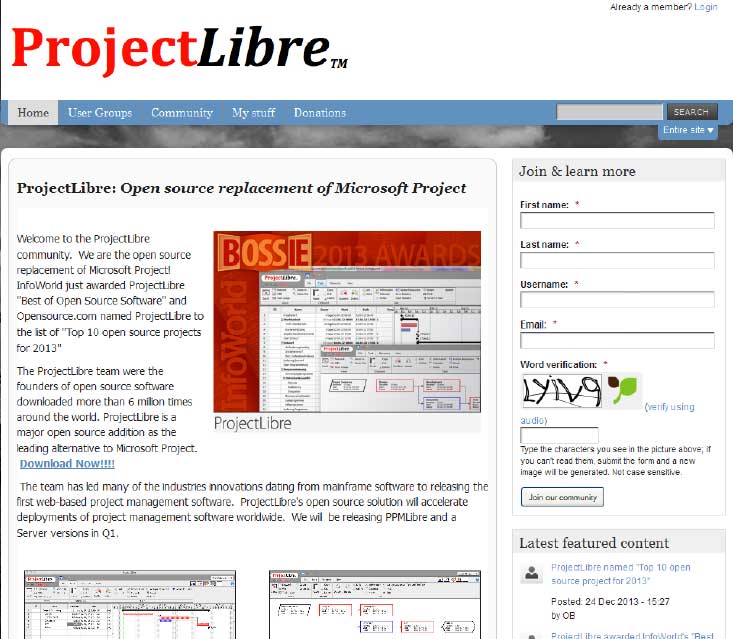 Project Libre is the open source replacement of Microsoft Project. It was one among the top 10 open source projects of 2013. With over 6 million downloads; it has most certainly captured the imagination of people around the world. Details of project Libre could be found at http://www.projectlibre.org/ . Project Libre has separate release for mainframes. It also has a web based version which further increases its overall appeal. One of the main advantages is that it has a list of tasks that can be tracked to closure. It can also be used in conjunction with LibreOffice to provide a great set of tools to the team leaders.
Diaspora
One of the biggest challenges in pursuing a career in software development is to figure out which language you want to work. In addition to commonly used software programming languages like C, C++, Java a lot of new programming languages such as Python, Ruby on Rails have surfaced especially because they are used by a lot of consumer based start-ups these days.
With so many front and back end languages, the choice of learning Java is a failsafe decision and mastering Java can ensure that you have a bright future in software programming.
What is Java
Java is a computer programming language that is designed to be platform independent meaning that the language can virtually run on any hardware platform. This platform independence and an object oriented framework make Java the preferred language of development especially for client-server web applications.
Tech Life in Washington
| Company Name | City | Industry | Secondary Industry |
|---|---|---|---|
| Symetra Financial Corporation | Bellevue | Financial Services | Insurance and Risk Management |
| Alaska Air Group, Inc. | Seattle | Travel, Recreation and Leisure | Passenger Airlines |
| Expedia, Inc. | Bellevue | Travel, Recreation and Leisure | Travel Agents & Services |
| Itron, Inc. | Liberty Lake | Computers and Electronics | Instruments and Controls |
| PACCAR Inc. | Bellevue | Manufacturing | Automobiles, Boats and Motor Vehicles |
| Puget Sound Energy Inc | Bellevue | Energy and Utilities | Gas and Electric Utilities |
| Expeditors International of Washington, Inc. | Seattle | Transportation and Storage | Freight Hauling (Rail and Truck) |
| Costco Wholesale Corporation | Issaquah | Retail | Grocery and Specialty Food Stores |
| Starbucks Corporation | Seattle | Retail | Restaurants and Bars |
| Nordstrom, Inc. | Seattle | Retail | Department Stores |
| Weyerhaeuser Company | Federal Way | Manufacturing | Paper and Paper Products |
| Microsoft Corporation | Redmond | Software and Internet | Software |
| Amazon.com, Inc. | Seattle | Retail | Sporting Goods, Hobby, Book, and Music Stores |
training details locations, tags and why hsg
The Hartmann Software Group understands these issues and addresses them and others during any training engagement. Although no IT educational institution can guarantee career or application development success, HSG can get you closer to your goals at a far faster rate than self paced learning and, arguably, than the competition. Here are the reasons why we are so successful at teaching:
- Learn from the experts.
- We have provided software development and other IT related training to many major corporations in Washington since 2002.
- Our educators have years of consulting and training experience; moreover, we require each trainer to have cross-discipline expertise i.e. be Java and .NET experts so that you get a broad understanding of how industry wide experts work and think.
- Discover tips and tricks about Microsoft Office programming
- Get your questions answered by easy to follow, organized Microsoft Office experts
- Get up to speed with vital Microsoft Office programming tools
- Save on travel expenses by learning right from your desk or home office. Enroll in an online instructor led class. Nearly all of our classes are offered in this way.
- Prepare to hit the ground running for a new job or a new position
- See the big picture and have the instructor fill in the gaps
- We teach with sophisticated learning tools and provide excellent supporting course material
- Books and course material are provided in advance
- Get a book of your choice from the HSG Store as a gift from us when you register for a class
- Gain a lot of practical skills in a short amount of time
- We teach what we know…software
- We care…